

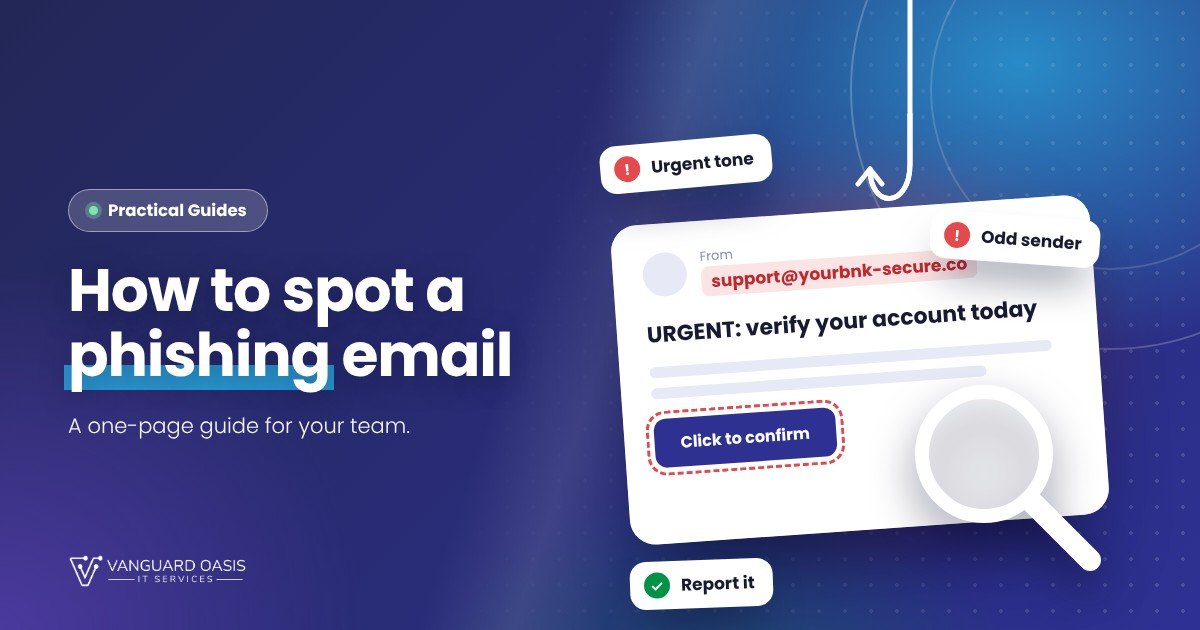
Phishing is the easiest way into a small business, and it works because it targets people, not computers. A message that looks like it comes from your bank, a courier or your boss asks someone to do something quickly.
Most of the time, they do.
This guide is written so you can hand it to your team. It takes five minutes to read, and it covers what to look for, what to do, and what to do if someone has already clicked.
Six warning signs
- It is urgent or frightening. "Your account will be closed today." "Pay now to avoid a penalty." Pressure is the main tool of a scammer. CISA, the US cybersecurity agency, lists urgent or emotional language that claims dire consequences for not responding as the first sign.
- The sender is not quite right. The display name looks fine, but the address behind it is odd, or the domain is one letter out, like a bank name with a different spelling. Check the address, not only the name.
- It asks for something sensitive. Passwords, card numbers, one-time codes and personal details should never be requested in an email.
- The link looks wrong. Hover over it before you click, and watch for shortened links and addresses that do not match the company. On a phone, press and hold to preview it.
- Payment details have changed. "We have a new bank account." This one costs small businesses real money. Always confirm by phone, using a number you already hold.
- You were not expecting it. An unexpected invoice, a parcel you did not order, or a file you did not request.
A word of caution on spelling and grammar. They used to be a reliable giveaway, but CISA now notes that polished writing is no guarantee that a message is genuine. Judge by the signs above, not by typos.
What to do if you are not sure
- Do not click, open attachments or reply.
- Check another way. Call the sender on a number you already have, or go to the company's website by typing the address yourself, not from the email.
- Report it. Use the report button in your mail program, or forward it to whoever looks after IT in your company.
- Then delete it.
What to do if you have clicked
It happens to careful people. What matters is speed, and not hiding it.
- Tell your IT contact straight away, even if you are not sure anything happened.
- If you typed a password, change it now, on the real site, and change it anywhere else you used the same one.
- Check that multi-factor authentication is switched on for that account.
- If you opened a file, disconnect the device from the network and wait for advice.
- If money or bank details are involved, call your bank immediately.
The no-blame rule
The worst outcome is a member of staff who clicks, panics and says nothing for a week. Make it clear that reporting a mistake straight away is the right thing to do, and that nobody will be blamed for it. The company that hears about problems early is the one that survives them.
Make it easy for your team
- Turn on spam and phishing filtering in your email system.
- Use multi-factor authentication, so a stolen password alone is not enough.
- Agree one way to report suspicious mail, and tell everyone what it is.
- Repeat the reminder every few months. Short and regular beats a long talk once a year.
Our security checklist for a 20-person company covers the technical steps behind this. If you would like help turning on the protections, ask us.
Sources: CISA: Recognize and report phishing
Want your team protected?
Book a free call and we will go through your email protection and tell you honestly what to switch on first. We reply within one working day.

0 Comments