

Excel is a wonderful reporting tool right up to the day it is not. Then the same person spends the first three days of every month copying numbers into it, and the board still gets figures that nobody can quite reproduce.
Power BI is the usual next step, but it is not the only one, and it is not always the right one. Here is how to tell where you are.
Signs Excel is struggling
- The monthly report is a manual job. Data is exported from two or three systems, pasted into a workbook and tidied by hand.
- The file is slow. It takes a minute to open, formulas lag, and people avoid touching it.
- Nobody trusts the numbers. Two reports show different totals for the same thing, and no one is sure why.
- Questions take days. A manager asks "what about by region?" and the answer means rebuilding something.
- You want it live. Staff need to see current figures on their phone, not wait for the monthly pack.
- Everyone should see only their part. A sales head sees sales, a branch manager sees one branch.
The steps between Excel and a full dashboard
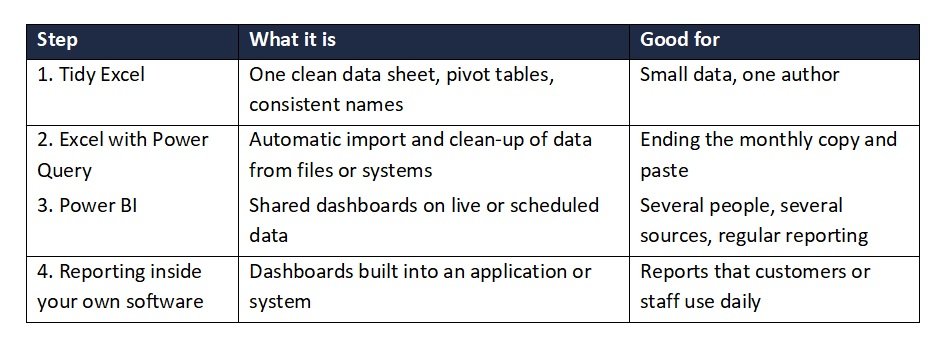
There is a ladder, and many businesses only need the first or second rung.
What Power BI costs
Power BI Desktop, where reports are built, is a free download. To publish and share reports, each person who builds or views them needs a licence. Microsoft's list price is $14 per user per month for Power BI Pro and $24 per user per month for Premium Per User, both paid yearly. Pro allows eight data refreshes a day, and Premium Per User allows 48 with much larger data models. For many small businesses Pro is plenty. Prices are US list prices, so check the current figures for the UAE before you budget.
The licence is usually the smaller cost. Most of the effort goes into getting data out of your systems and into a clean shape, which is why reports built on messy data disappoint. Power BI will not fix the numbers. It will only show them faster.
Questions to ask before you commit
- Where does the data live, and can it be reached automatically?
- Who will maintain the reports once they are built?
- How many people need to view them, and what should each one see?
- How fresh must the figures be: daily, hourly, live?
- Would a simple dashboard inside our own software do the job better?
How we can help
We build dashboards and reporting on top of your application or existing data as part of our software development work. For larger Power BI implementations, we coordinate certified partners and stay your point of contact. We would rather start by looking at what you report on today, and tell you honestly if a better-organised Excel file is all you need.
Sources: Microsoft Power BI pricing
Not sure which step you need?
Book a free call and we will give you a rough estimate and an honest view on what fits your business. We reply within one working day.

0 Comments